Collect details with forms that open right inside WhatsApp

WhatsApp Flows are native, multi-screen forms. Customers complete sign-ups, quote requests, surveys and bookings without leaving the chat, and every answer lands in Wabachimp.

  • Native forms inside WhatsApp
  • Text fields, dropdowns, dates and options
  • Answers saved to the contact
  • Send answers to Google Sheets or your CRM

Built on the official WhatsApp Business Platform by

Form builder

Build interactive forms in minutes, without code

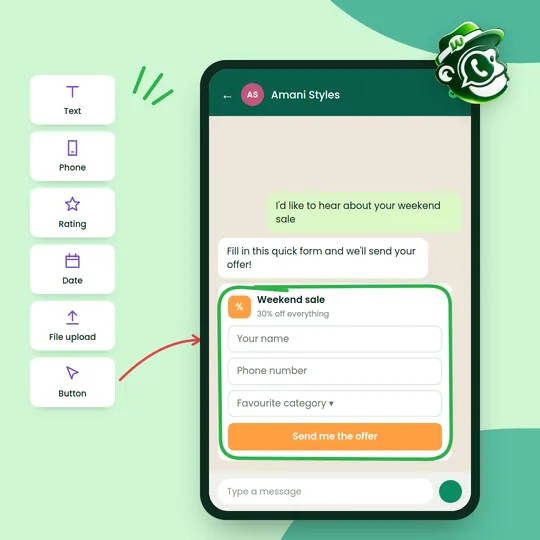
Drag in the fields you need, such as text, phone number, rating, date, file upload or buttons, and your form opens right inside the WhatsApp chat.

  • Many question types: Text, phone, rating, date, choices and file upload
  • Smart logic: Show or skip questions based on earlier answers
  • Your branding: Add your name, colours and wording
  • One-click publishing: Use it in chatbots, buttons and campaigns
Get started
A form builder palette next to a WhatsApp form for a weekend sale with name, phone and category fields
Response analytics

Track every response in real time

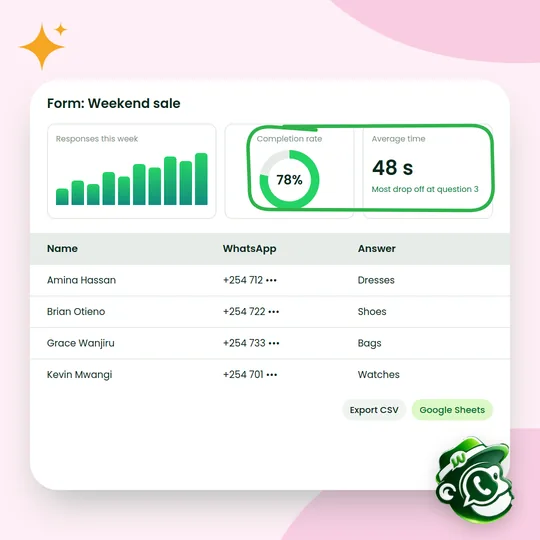
See how many people start and finish your forms, how long they take and where they drop off, then export answers to CSV or Google Sheets.

  • Live responses: See answers the moment they arrive
  • Completion insights: Find the question where people stop
  • Easy export: CSV, Excel or Google Sheets
  • Search and filter: Find any response quickly
Get started
A form dashboard showing weekly responses, a 78% completion rate, average time and a table of answers
Smart automation

Act on every answer automatically

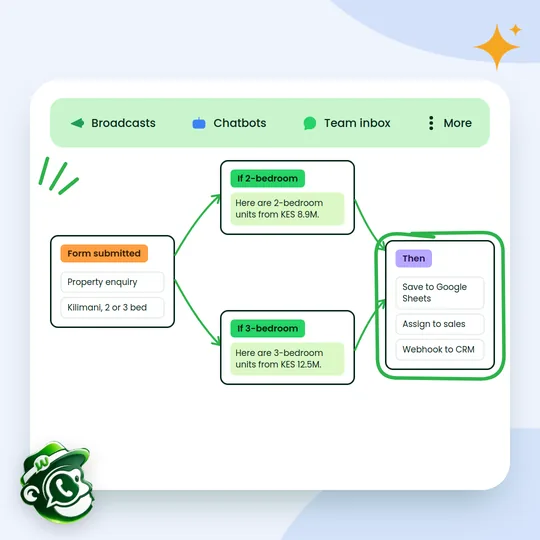
Trigger the right reply based on what customers choose, then save the answers, assign the lead and send the details to your other tools.

  • Conditional replies: Different messages for different answers
  • Connected tools: Google Sheets, webhooks and your CRM
  • Lead routing: Send hot leads to the right salesperson
  • No manual work: Everything happens the moment a form is sent
Get started
A property enquiry form sending 2-bedroom or 3-bedroom listings, then saving to Google Sheets and assigning to sales

Forms for every part of your business

A few of the ways Kenyan businesses use WhatsApp Flows.

Lead capture and qualification

Qualify prospects with a few targeted questions before they reach your sales team.

  • Score leads from their answers
  • Route hot leads to the right salesperson
  • Save every answer to the contact

Feedback after purchase

Send a short survey after each order or visit and learn what customers really think.

  • Send automatically after delivery
  • Star ratings and comments
  • Alerts for unhappy customers

Event registration

Register attendees with their choices and send confirmations and reminders automatically.

  • Confirmation messages straight away
  • Capacity limits and waitlists
  • Reminders the day before

Support tickets

Let customers raise support requests in WhatsApp and route them to the right team.

  • Ticket created automatically
  • Priority-based routing
  • Status updates in the chat

Custom orders

Take orders with sizes, options and add-ons, then send a payment request in the same chat.

  • Options and add-ons in one form
  • Totals worked out for you
  • Order confirmation and payment link

How it works

Up and running in three steps.

  1. Design the form

    Build screens with the fields you need, from names and phone numbers to dates and multiple choice.

  2. Send it in chat

    Attach the form to a chatbot step, a campaign or a button in any message.

  3. Use the answers

    Responses are saved to the contact and can trigger replies, tags or a sync to your tools.

Questions about WhatsApp Forms

Something else on your mind? Message us on WhatsApp and a person will reply.

How is a Flow different from a chatbot question?

A chatbot asks one question per message. A Flow opens a proper form with several fields, dropdowns and date pickers, which is quicker for longer sign-ups.

Do customers need to install anything?

No. Flows open inside the normal WhatsApp app.

Where do the answers go?

They're saved on the contact in Wabachimp and can be sent to Google Sheets, your CRM or any webhook.

Can I send a Flow in a campaign?

Yes. Add a form button to an approved template and send it to a segment.

Start using WhatsApp Forms this week.

Read

Create your free account

Tell us about your business. We'll set up your account and help you connect your WhatsApp number.

Prefer to talk first? Chat with us on WhatsApp