One WhatsApp number. Your whole team answering.

Bring every customer chat into a shared inbox. Assign conversations to the right person, add notes and tags, and always know who is replying to whom.

  • Your whole team on one number
  • Assign chats by hand or automatically
  • Private notes and customer tags
  • Full history for every customer

Built on the official WhatsApp Business Platform by

Live chat dashboard

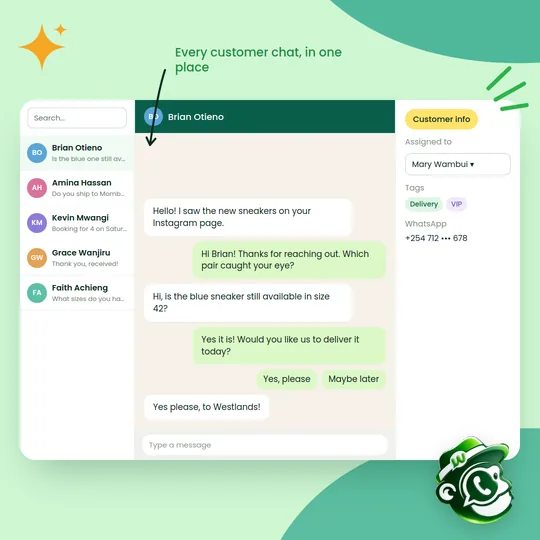
Manage every customer chat from one dashboard

Bring all your customer messages into one shared inbox. Reply, assign and keep track of every conversation as a team, from any laptop or phone browser.

  • One view: Every customer chat together
  • Easy assignment: Send chats to the right teammate
  • Stay organised: See who is handling each chat in real time
  • Quick replies: Answer faster and keep customers happy
Get started
A shared WhatsApp inbox showing a list of customer chats, an open conversation and customer details
Chat assignment

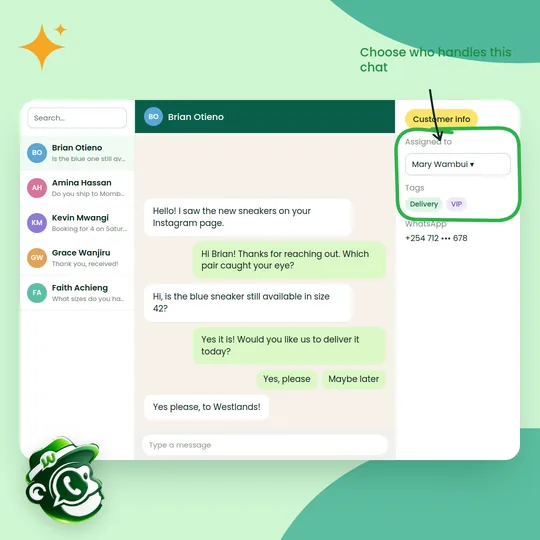
Assign chats to the right person in a click

Make sure no message goes unanswered. Assign each chat to a teammate, share the workload and let colleagues help each other on tricky conversations.

  • Faster replies: Someone is always ready to step in
  • Shared workload: Spread chats evenly across the team
  • Better teamwork: Hand over chats with the full history
  • Consistent service: Every customer gets a timely, helpful answer
Get started
A shared inbox with the chat assigned to Mary Wambui in the customer info panel
Privacy controls

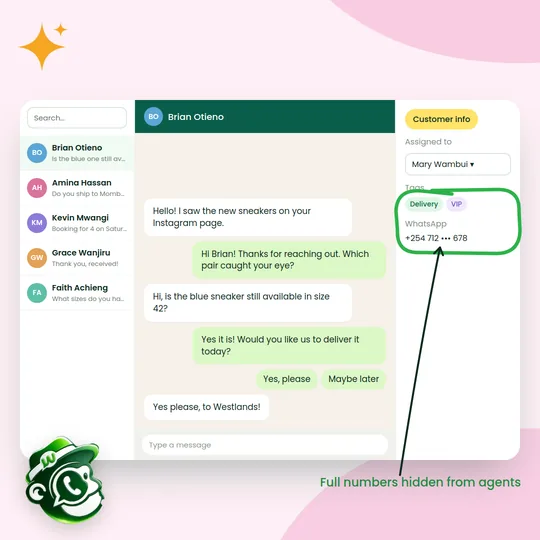
Protect your customers' phone numbers

Hide customers' full phone numbers from agents, so your team can help without seeing personal contact details. It reduces the risk of numbers being misused or taken elsewhere.

  • Prevent leaks: Agents see a masked number
  • Controlled access: Admins decide who sees full details
  • Customer trust: Show customers you take privacy seriously
  • Data protection: Supports your obligations under Kenya's Data Protection Act
Get started
A shared inbox where the customer's WhatsApp number is masked from the agent
Tags and filters

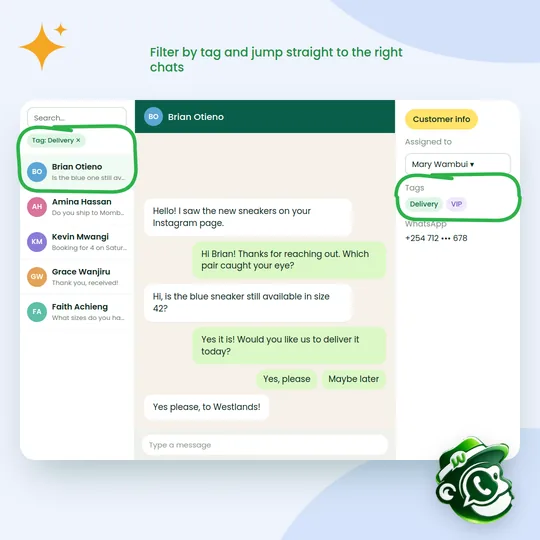
Find important chats faster with tags

Tag chats by topic or customer type, such as delivery, VIP or complaint, then filter to see exactly the conversations you need without endless scrolling.

  • Organised chats: Tag by topic, stage or customer type
  • Quick filters: Jump straight to the chats that matter
  • Clear priorities: Spot VIPs and complaints at a glance
  • Better service: The right chats reach the right people
Get started
A shared inbox filtered by the Delivery tag, with tags shown on the customer
Saved replies

Reply faster with saved replies

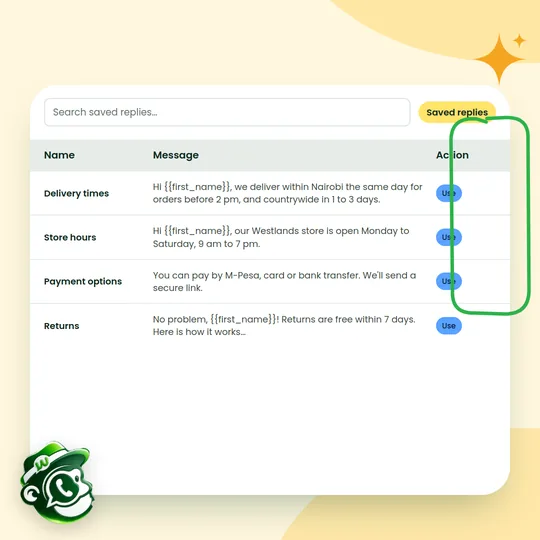
Save answers to the questions you get every day, such as delivery times, store hours and payment options, and send them in one click, personalised with the customer's name.

  • Instant answers: Common questions answered in seconds
  • On-brand every time: Everyone sends the same accurate reply
  • Less typing: More time for complex conversations
  • Happier customers: Quick, consistent answers
Get started
A list of saved replies for delivery times, store hours, payment options and returns, each with a Use button

How it works

Up and running in three steps.

  1. Connect your number

    Link your WhatsApp Business number once. Every incoming chat lands in the shared inbox.

  2. Invite your team

    Add sales, support and delivery staff, each with their own login and role.

  3. Route and reply

    Chats are assigned by rules or by hand, and everyone can see who owns each conversation.

Who it's for

A few of the ways Kenyan businesses put it to work.

  • Customer support

    Several agents handle one support line without stepping on each other.

  • Sales teams

    Leads go straight to the right salesperson, with notes from the last chat.

  • Delivery and logistics

    Riders and dispatch share updates on the one number customers know.

  • Agencies

    Manage client conversations with clear ownership and handovers.

Questions about the shared inbox

Something else on your mind? Message us on WhatsApp and a person will reply.

How many people can use the inbox?

As many as your plan allows. Each person gets their own login, and every chat shows who is handling it.

Can I keep using WhatsApp on my phone?

Your team replies from Wabachimp in any browser, on a phone or a computer. Ask us about keeping the WhatsApp Business app on the same number, as that depends on what Meta supports for your account.

Can chats be assigned automatically?

Yes. Use rules based on keywords, chatbot answers, the ad a lead came from or the time of day, or spread chats evenly across agents.

Can I limit what each person sees?

Yes. Roles control access to contacts, exports, campaigns and settings.

Start using the shared inbox this week.

Read

Create your free account

Tell us about your business. We'll set up your account and help you connect your WhatsApp number.

Prefer to talk first? Chat with us on WhatsApp