Send Personalized WhatsApp Messages in Bulk in One Click

Send updates, promotions, or reminders to your customers all at once.

  • Personalised with each customer's details
  • Delivered, read and replied tracking
  • Schedule campaigns in advance
  • Buttons for one-tap replies and links

Built on the official WhatsApp Business Platform by

Personalised bulk broadcasts

Reach every customer with a personal touch

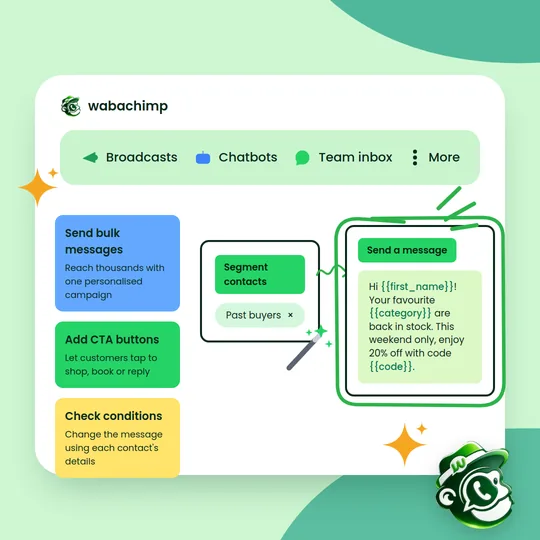
Send one campaign and every customer gets a message with their own name and details. Whether it's a greeting, an offer or an update, it feels written just for them, so more people read it and reply.

  • Each message uses the customer's own name and details
  • Personal messages get more reads and replies
  • Send to hundreds or thousands in minutes
  • Regular, relevant messages build lasting relationships
Get started
A Wabachimp campaign builder: a "Past buyers" segment feeding a personalised message with first name, category and discount code fields
Targeted broadcasts

Send the right message to the right people

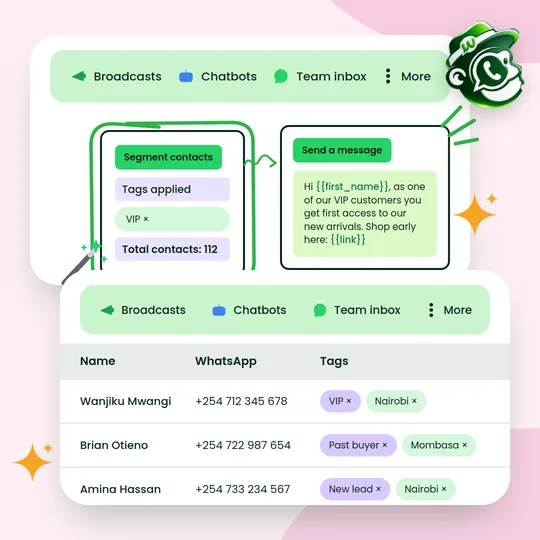
Group customers by interests, location, purchases or activity, and send each group a message that matters to them. No more one-size-fits-all campaigns.

  • Send offers only to the people who will care
  • Relevant messages get better responses
  • Build a segment and broadcast in a few clicks
  • Tag contacts automatically from chats and forms
Get started
A VIP segment of 112 contacts receiving an early-access message, above a contact list tagged by location and customer type
Buttons in messages

Turn every message into an action

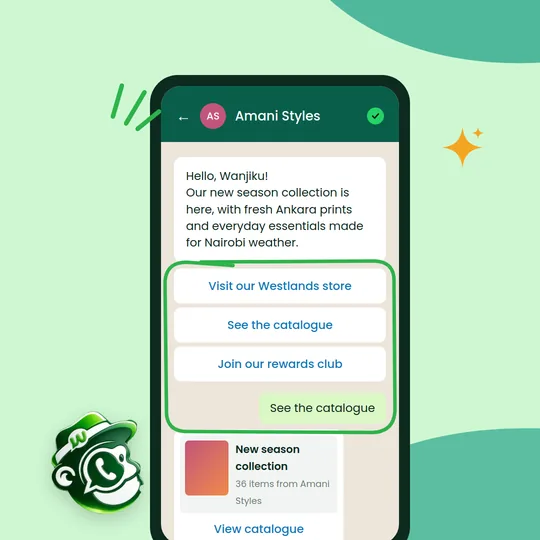
Add buttons so customers can visit your store, browse your catalogue, book or call you with a single tap, right from the message.

  • Customers act straight from the message
  • Clear buttons make the next step obvious
  • More engaging, easier-to-use messages
  • Fewer steps between interest and purchase
Get started
A WhatsApp message from Amani Styles with buttons to visit the store, see the catalogue and join the rewards club, and a catalogue reply
Campaign scheduling

Plan your campaigns ahead of time

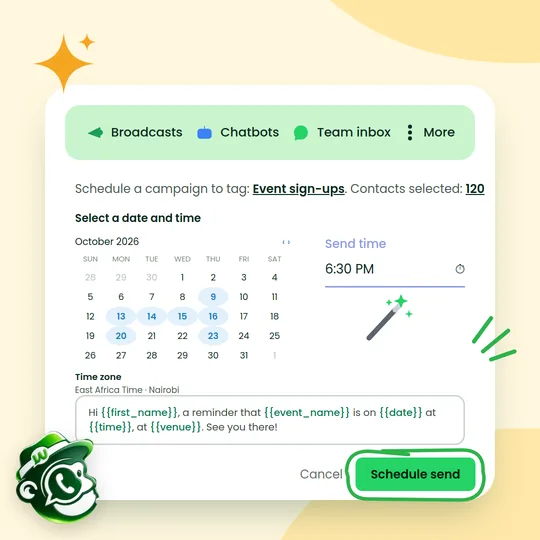
Set campaigns to go out exactly when you want, days or weeks in advance. Reach customers when they're most likely to read, without sending anything by hand.

  • Schedule once and let campaigns run themselves
  • Send when your customers are most active
  • Stay in touch even when you're offline
  • Plan the whole week's messages in one sitting
Get started
Scheduling a campaign to 120 event sign-ups for 6:30 pm Nairobi time, with a calendar and a personalised reminder message
Message tracking

Know who received and read your messages

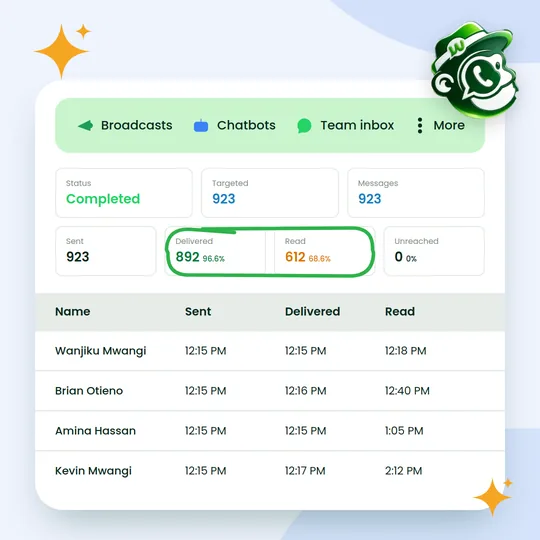
See delivery and read receipts for every message you send. Know exactly who received and opened your campaign, so you can follow up with the right people and keep improving.

  • See which messages were delivered and read
  • Spot who engaged and follow up with them
  • Learn what works and improve your next campaign
  • Track every customer, message by message
Get started
A campaign report: 923 sent, 892 delivered and 612 read, with delivery and read times for each customer
Opt-outs handled for you

Respect every customer's choice, automatically

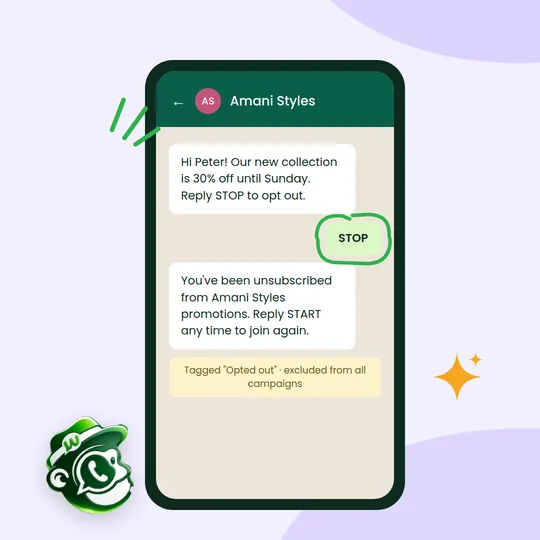
WhatsApp only works long term if people want your messages. Wabachimp honours STOP requests instantly and keeps opted-out contacts out of future campaigns, protecting your number's reputation.

  • Record where and when each contact opted in
  • Replies like STOP unsubscribe automatically
  • Opted-out contacts are left out of every campaign
  • A healthy quality rating keeps your sending limits rising
Get started
A customer replies STOP to a promotion, receives an automatic unsubscribe confirmation and is excluded from future campaigns

How it works

Up and running in three steps.

  1. Import your contacts

    Upload a CSV or Excel file, or sync from your store or CRM. Tag and group contacts as you go.

  2. Write once, personalise for all

    Choose a Meta-approved template and drop in fields like name, order number or due date.

  3. Send now or schedule

    Send immediately or pick a date and time, then watch deliveries and reads update live.

Who it's for

A few of the ways Kenyan businesses put it to work.

  • Retail and e-commerce

    Announce new stock, flash sales and restock alerts to past buyers.

  • Schools

    Send fee reminders, term dates and event notices to parents.

  • Real estate

    Share new listings with buyers who match the location and budget.

  • Clinics and salons

    Remind clients about follow-ups and fill quiet days with offers.

Questions about bulk WhatsApp broadcasts

Something else on your mind? Message us on WhatsApp and a person will reply.

How many messages can I send?

Meta sets a daily limit on how many different people a number can start conversations with. New numbers start lower, and the limit rises automatically as you send messages people read and reply to.

Do customers have to opt in?

Yes. WhatsApp requires that people agree to hear from you before you message them. Wabachimp records opt-ins, and our chatbots and forms can collect them for you.

What does a campaign cost?

Your Wabachimp plan covers the platform. Meta charges for template messages at its official rates, paid directly to Meta, and we add 0% on top.

Can I send images, videos and documents?

Yes. Templates can carry an image, video or document, plus text and buttons.

Start using bulk WhatsApp broadcasts this week.

Read

Create your free account

Tell us about your business. We'll set up your account and help you connect your WhatsApp number.

Prefer to talk first? Chat with us on WhatsApp